 Wingware
Wing Tips: Unit Testing with the AI Agent in Wing Pro 12
This Wing Tip covers unit testing with Wing Pro 12's Claude Code agent integration. For the manual workflow -- identifying test files, running and debugging tests yourself, collecting code coverage -- see the parallel Unit Testing Wing Tip.
Setting the Testing Regimen
By default, Wing asks Claude Code to write unit tests for new code and to run those tests successfully before considering its task complete. As long as your code base already has tests, it will do that. If your code base has no existing tests, you may need to nudge it a bit to get it started.
To override this default, set Testing Regimen on the AI Agent tab of Project Properties. Wing compiles your choice into the agent's instructions, so each Claude Code session it starts already knows what you expect.
The regimens trade thoroughness for speed:
- None -- The agent never writes or runs tests on its own. Use this if testing is a separate QA or release step.
- Minimal (the default) -- Writes tests for new code and runs those new tests before considering the task finished.
- Balanced -- Minimal, plus before review or commit it re-runs any stale tests in the directories you changed.
- Thorough -- Also runs new and stale tests at task end, and before review or commit it runs every stale test in the project.
- Obsessive -- Runs every test in the directories you changed at task end, and the full suite before review or commit.
- Custom -- Configure each of the detailed testing regimen axes on its own (when to write tests, what to run before task completion, what to run before review, and what to run before commiting without review)
A test is "stale" when Wing's code-coverage data shows your change touched code that the test depends on. Wing monitors code coverage automatically while the agent runs tests, so the stale-test regimens work without a separate "run everything first" step. Stale detection is a fast heuristic, not a guarantee -- it can miss tests that haven't run recently or that exercise hard-to-trace code -- so whatever regimen you use day to day, plan to run the full suite before a release or a merge to a long-lived branch.
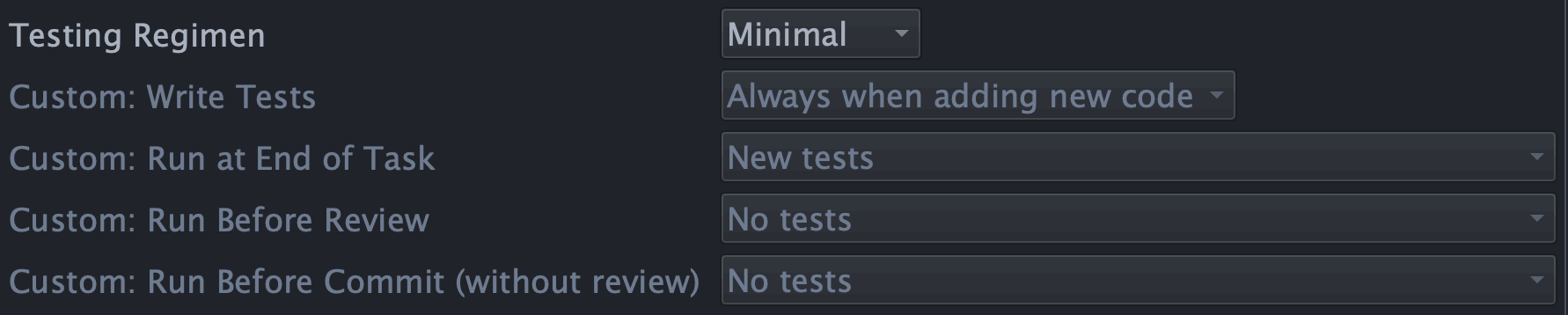
Shown above: The Testing Regimen options on the AI Agent tab of Project Properties, which tell the agent how much to write and run tests on every task.
Iterating on Failures
Once a regimen is set, testing is the agent's job, not yours. When a test fails, the agent reads the failure, refines the code, and re-runs -- and it won't consider a task done until the tests it was asked to run pass.
You generally don't need to step in. If the agent hits something it can't resolve on its own -- a fundamental problem rather than a quick fix -- it stops and reports back, or asks how you'd like to proceed, rather than quietly weakening or skipping a test to force a green run. You can watch the Testing tool update as it works if you like, but the results are also part of the task summary you review before accepting.
For full reference, see the Unit Testing documentation and Wing's Claude Code Agent Integration.
That's it for now! We'll be back soon with more Wing Tips for Wing Python IDE.
As always, please don't hesitate to email support@wingware.com if you run into problems or have any questions.