 Wingware
Wing Python IDE 12.1 Beta - October 9, 2026
Wing 12.1 is now available as a beta release. It introduces the Tasks Manager for guided autonomous development. You write the specification, answer questions, and review results. Agents design and write the code, unit tests, and documentation. Wing keeps you in control, so you can decide what to delegate, how to review the results, and when to ship.
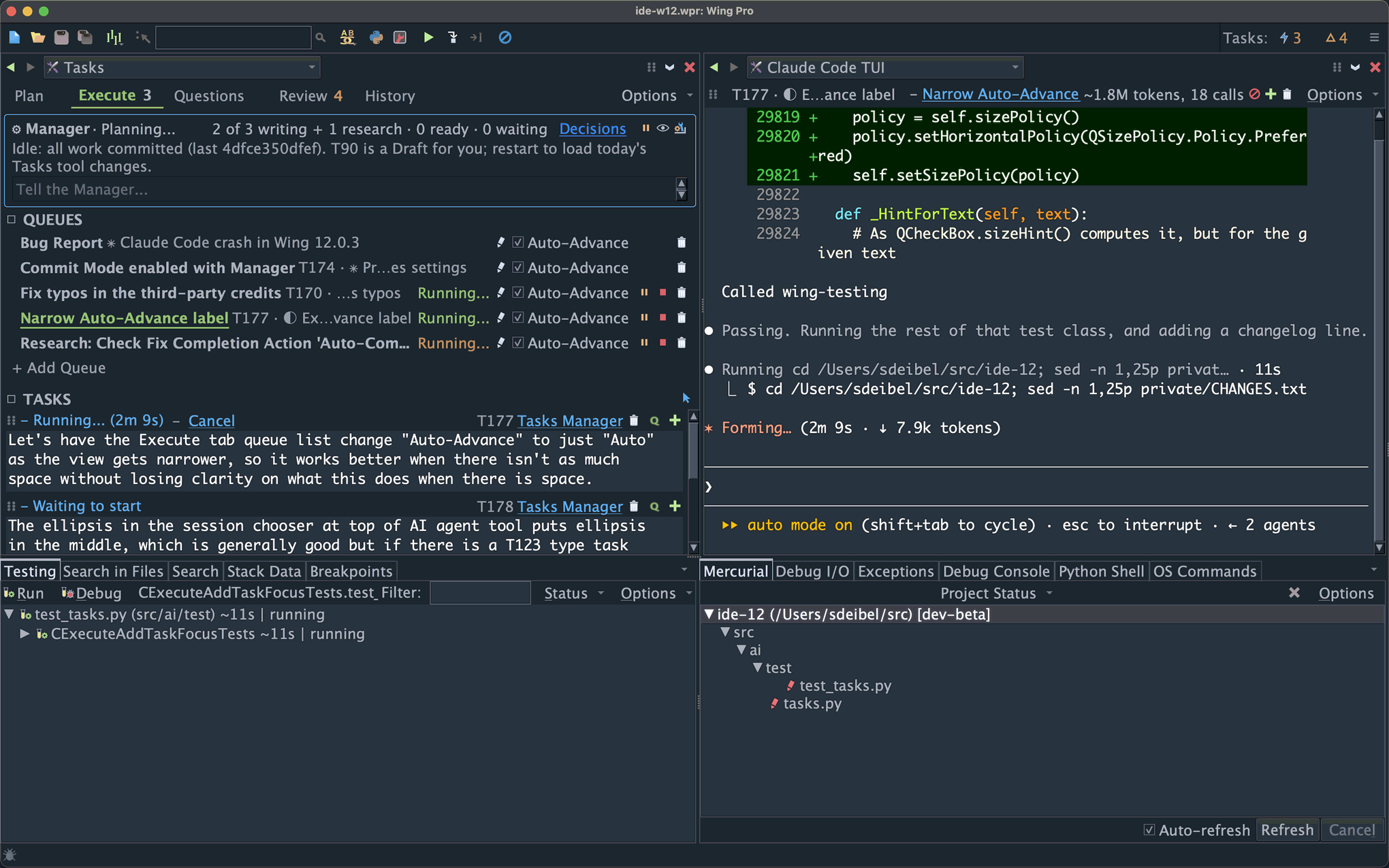
The Tasks Manager accepts anything from a bug report to a high-level specification for a new software product. It breaks down larger tasks, maps out an implementation strategy, decides what tasks can safely run at the same time, dispatches the work to AI worker agents, collects questions that need your attention, tracks problems the agents find along the way, and lines up the results for your review.
You remain in control at whatever level you're comfortable with: inspect every change in the code, read a high-level task summary and react to choices made by the agents, or simply try the result and give instructions for further development.
Wing Pro 12.1 also introduces support for other AI coding agents, now including Claude Code, Codex, Antigravity, Copilot, Cursor, goose, and OpenCode, plus any other agent that speaks the Agent Client Protocol (ACP).
The Tasks Manager and AI agent support are features of Wing Pro only. Other improvements in Wing 12.1, such as the new Modern look and display themes, are also in Wing Classic and Wing 101, as described below.
Downloads
This is a beta release. Please try it and email us if you find problems or have suggestions!
Wing 12.1.0 -- Full featured Python IDE with two licensing tiers
Wing 101 12.1.0 -- Free IDE for teaching beginners to program
Wing 12.1 will replace Wing 12.0 when it is installed. You can revert to Wing 12.0 by reinstalling it at any time.
To get started quickly with autonomous development in Wing 12.1, see Getting Started with Autonomous Development.
New in Wing 12.1
Autonomous Development with the Tasks Manager
The new Tasks Manager is an agent that runs the Tasks tool's queues for you, so that development proceeds autonomously under your direction. You write tasks, mark the ones you want started as Ready, and review what comes back.
The Manager can break down high-level specifications into a design and development plan. It decides task order, serializes those that are likely to edit the same files, and runs closely related tasks in shared session context. It can message a running agent to tell it about related work or new insights, or redirect it if it goes astray.
While the Manager is on, tasks run autonomously: Rather than stopping to ask questions or present intermediate results, each works as far as it can and ends with a report of the judgement calls it made along the way, and any questions it has left. A new Questions tab in the Tasks tool collects everything that is waiting for you, so you can provide answers in one place. Follow-up work and problems that agents notice as they run are added to the Plan tab of the Tasks tool as new tasks. It may automatically start found tasks that are closely related to ongoing work; others wait for your review.
You remain the one who decides which work runs, how much the Manager can do, and how results are reviewed. Every change the Manager makes is listed and can be reverted or revised, even after they are committed. You can also talk to the Manager to ask why a task is being held, sort out a stuck queue, or give it special instructions about your development workflow.
Your Choice of AI Agent
Claude Code and Codex (run using its TUI) are best for autonomous development, since they self-check the safety of commands that they run. Antigravity, Copilot, and Cursor also work but don't implement the same level of safety checks. goose and OpenCode are not recommended for autonomous development. AI Agent Safety in the AI Agent-Assisted Development chapter of the manual in Wing 12.1's Help menu compares the agents in detail.
Each agent can run in one of two ways. A TUI session runs the agent's own terminal user interface inside Wing's AI Agent tool, and is the recommended way to use every agent that has one. An ACP session talks to the agent over the Agent Client Protocol and renders in Wing's AI agent conversation UI. Goose and some other agents work only through ACP.
Every agent gets Wing's MCP servers for code analysis, debugging, testing, and review, along with development guides that teach it how to work with Wing. The AI Agent tool, the Tasks tool, FIX and code actions, Write Tests, the review workflow, commit modes, the testing regimen, and autonomous task queueing all work the same way with every agent.
Each queue in the Tasks tool can use a different agent. Agents may run on the same host as the IDE or on a remote host.
You bring your own subscription or API key for the agent you choose. Wing does not install agents or provide access to models.
Other Improvements
User Interface: An optional new Modern look redesigns the toolbar, Preferences dialog, status bar, and tab overflow, and improves the display font. A welcome window lets you choose what to open at startup. Two new display themes, Night Flight and Solo Flight, have been added. Themes can now be imported from VS Code, created from a small set of colors, or exported from your current color configuration.
Tasks Tool (Wing Pro): New Checklists hold recurring reviews, fixes, and release and deployment steps. A task's committed changes can now be reverted, edited, or commented on. Every task has a short ID that links to the task wherever it is cited, and mini-search works on every tab. Tracking of changes made by concurrently running tasks is more reliable, and there are many other fixes to task and session management.
Version Control (Wing Pro and Wing Classic): The Git and Mercurial logs now show a graphical history with expandable diffs, Project Log replaces Show Changeset, and the editor can show annotations with commit message tooltips.
Editor and Analysis: In all products, the editor's scroll bar shows marks for diffs, search matches, and errors and warnings. In Wing Pro and Wing Classic, source analysis is faster and its database is about 30% smaller.
Other Changes: Wing now offers to remove large cache directories left behind by older versions. Accept Debug Connections has moved to Project Properties so it is set per project.
Wing 12.1 also includes many bug fixes, particularly for remote development and Docker containers, debugging free-threaded Python on Windows, git worktrees and submodules, non-ASCII text on Windows, unit test discovery, and display themes. See the change log for details.
To get started quickly with autonomous development in Wing 12.1, see Getting Started with Autonomous Development, which also covers usage hints and known limitations of this beta release.
If you have questions, please don't hesitate to contact us at support@wingware.com.