 Wingware
Wing Pro 12.1 Autonomous Development Test: Online Tea Shop
This demo tests the autonomous Tasks Manager in Wing Pro 12.1 on its largest request so far: all the software for a small online specialty tea business, run from home on one leased server. The user described the business in a text file and asked for an assessment. From there the Tasks Manager had the plan and a legal review researched, filed the plan's eleven phases as tasks, and ran AI agents on them up to four at a time. The result, Teashop, is a Django application with a public storefront, cart and checkout, inventory, order fulfillment, reports for the books and taxes, a marketing email list, and AI agents for customer support, marketing and server upkeep, with over 800 tests.
Claude Code did the coding in each task. Wing Pro supplied everything around it: the research and planning, the breakdown into tasks, running them side by side, checking and committing each one, and a record of every decision for the user to review.
At a Glance
- Wing Pro 12.1, with Claude Code using Claude Opus 5.5
- About 6 hours 25 minutes of wall-clock time on November 1, 2026, from 5:19 pm to 11:43 pm, with 7 hours 9 minutes of agent work. A person wrote the description of the business and the prompts quoted below, answered the planning questions, and picked a design from a mockup.
- 53 tasks and 37 commits, with 30 more tasks filed along the way and left for later
- Code: github.com/wingware-dev/teashop
- Run record: run-trail/RUN.md
The Request
The user wrote a description of the business in a text file, and started the run with a one-line prompt, entered as a task in Wing's Tasks tool:
See the file teashop.txt for a description of the project I want to start.
The file is about two pages long. It asks for six capabilities: an inventory that tracks tea by weight and packaging by the unit, a public store with a natural design of leaves, flowers, birds and insects in light and dark themes, a fulfillment dashboard that buys and prints shipping labels, sales reports and the data needed for taxes, simple deployment and security upkeep on the server, and help with social media and an opt-in email list. The business should run itself as far as possible, with the owner approving anything public or anything that costs money. It ends:
This is a large from-scratch project, a complete mostly automated company and all the software behind it. Ask me about any details I've forgotten, as needed. Let's start by assessing the above for feasibility and estimating about how much time would be involved in developing and setting this all up.
Planning the Business
The Tasks Manager ran the prompt as a research task, asking for a fuller set of requirements, feasibility for each capability, what to build and what to buy, a rough schedule, and a list of open questions. The agent recommended Django and PostgreSQL, and buying payments, shipping labels, accounting and payroll from established services rather than building them, since those carry legal and financial risk and are cheap to buy.
The user answered its questions, then asked for a second round of research:
Next I would like to investigate all the legal, regulatory, tax, etc, issues that affect the business to see if it's feasible from that standpoint.
The legal review covered licensing for packing food at home, sales tax, labelling of flavoured and herbal teas, organic claims, and importing tea. Each answer the user gave changed the plan, and the agent kept the earlier reports alongside the new ones. The user then had the Tasks Manager file the plan's eleven phases as tasks.
The Build
The first phase built the Django project, the owner's two-factor login, an append-only audit log, Docker deployment with backups and rollback, and scripts for hardening the server. A test harness came next, which opens each page in a headless browser at phone and desktop widths, in both themes, checks it against WCAG 2.2 AA, and saves screenshots. The agents used it to check their own work, and the milestone screenshots in doc/shots come from it. Here is the storefront as phase 3 first built it, showing made-up sample teas:
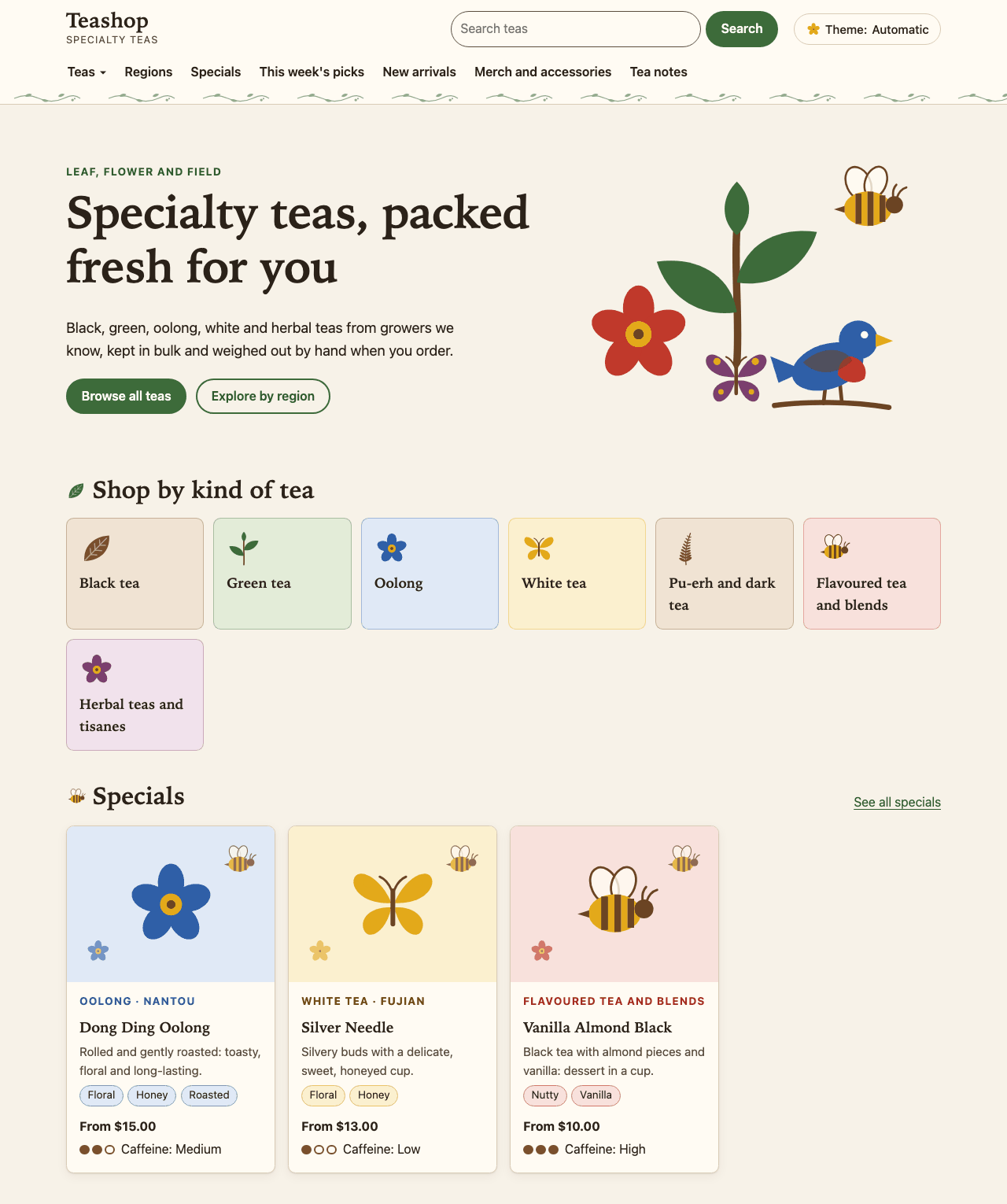
Shown above: The storefront home page at the phase 3 milestone.
The remaining phases ran side by side where their work didn't overlap: checkout with hosted payment, USPS rates and sales tax, the packing queue and shipping labels, the owner dashboard and reports, purchasing and loss tracking, the email list, and the three AI agents. When two tasks had to edit the same files, the Tasks Manager told each worker what the other was changing. It told the support agent's worker to put the parts the marketing and operations agents would share later, such as the client interface, its offline stand-in and a monthly spending cap, in one app they could all reuse.
The agents filed 14 problems they found outside their own tasks as new tasks, and regression sweeps after the larger phases found more. The Tasks Manager ran the fixes and left smaller features and ideas for later. It also corrected itself once: it had asked a worker to recompress the committed screenshots, and when the worker pointed out that this would grow the repository's history more than it saved, the Manager agreed and withdrew the request.
The customer support agent answers on its own only when there is no judgement call to make, and otherwise drafts a reply for the owner, learning the owner's wording from the edits:
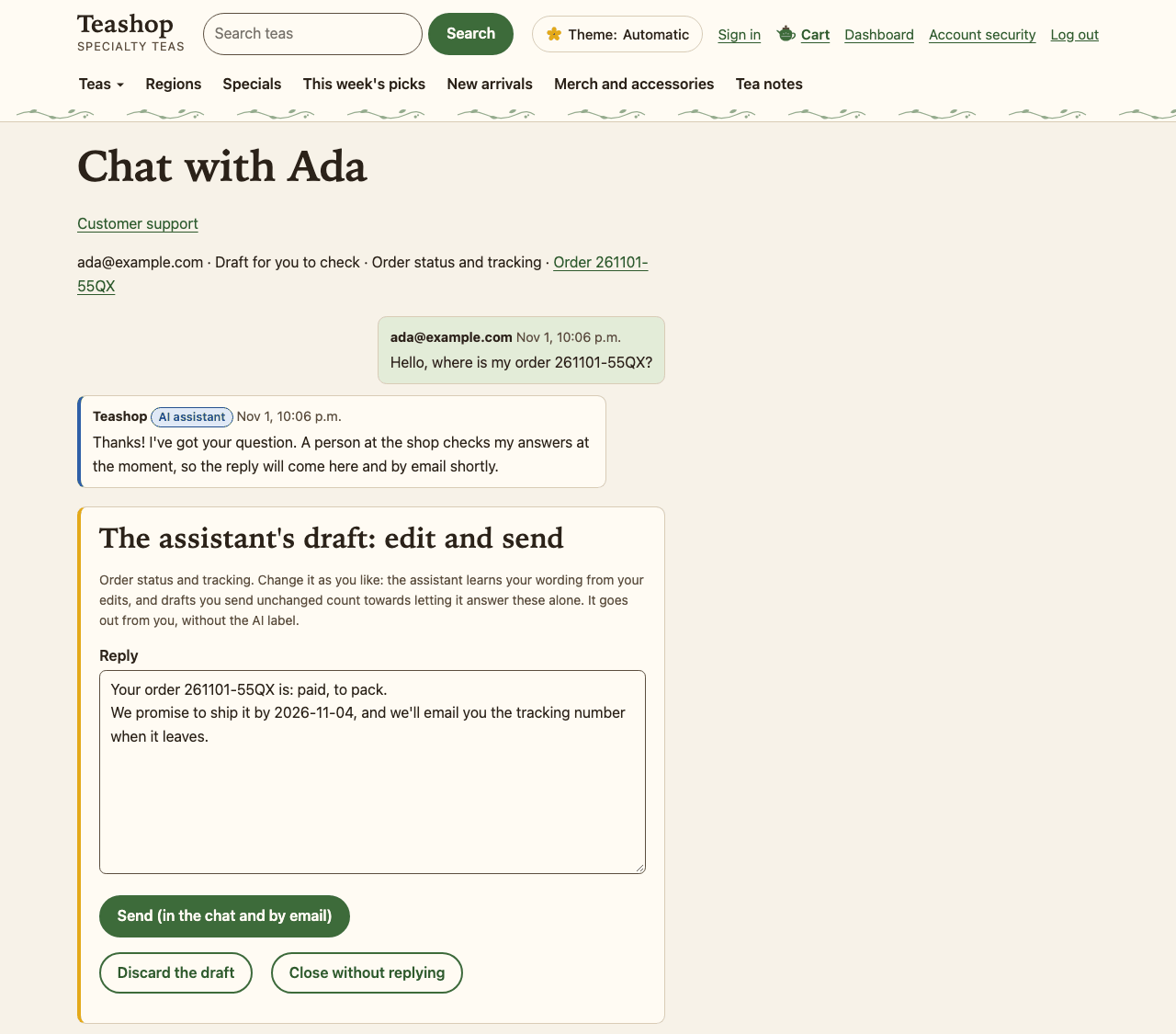
Shown above: A customer's question and the support agent's draft reply, waiting for the owner.
The AI agents run on an offline stand-in until they're given an API key. The support agent's worker asked whether the owner's Claude subscription would cover a program answering customers around the clock. The Tasks Manager passed the question to the user, who chose to keep the stand-in for now.
The Redesign
Late in the run, the user made two more requests. The first asked where the dashboard set up inventory and shipping supplies, and for sample data in the development database. That task grouped the setup pages under dashboard shortcuts and wrote a command that loads a made-up shop. Using the sample data, its worker and a follow-up task each found a bug in fulfillment, and both were fixed.
The second asked for a richer look:
The graphic design of the site is a bit weak. I was envisioning much richer natural look, with vines and branches and leaves twining around the edges and between page areas. The leaves. birds, insects, etc, would be in those vine/branch/leaf areas. The overall look inspired by elven art, art nouveau, and jugendstil era German children's books. Can you work up a mockup for me to react to, opening it in my browser when done?
The agent drew the vines, leaves, birds and insects as original inline SVG, and built a mockup with switches for three palettes and three densities of ornament. The user picked the "Spring moss" palette and medium ornament in a review comment, and the Tasks Manager filed a task that applied the style to the customer pages:
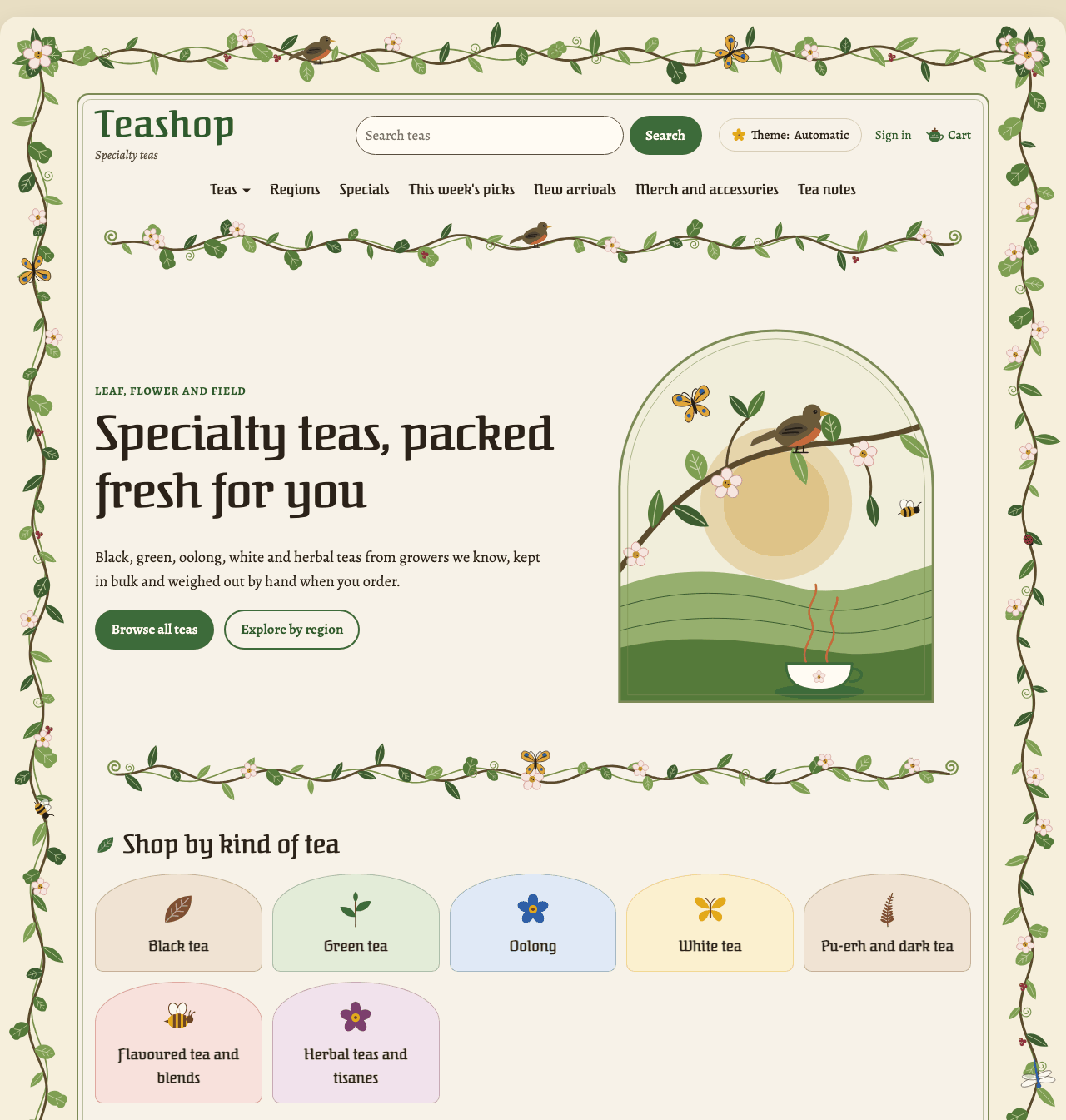
Shown above: The storefront home page after the redesign.
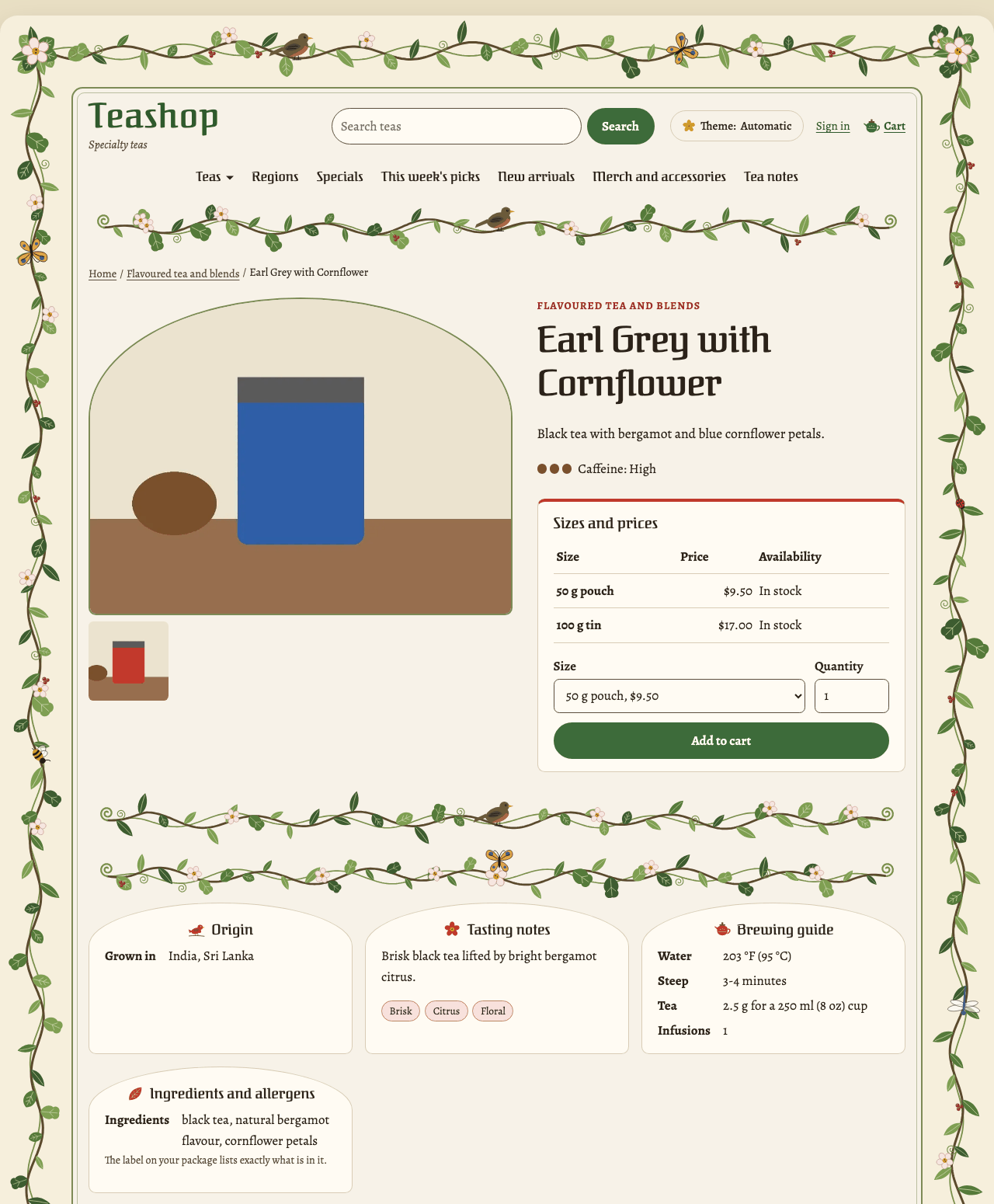
Shown above: A product page in the new style, with made-up sample data.
The Result
Teashop covers all eleven phases of the plan, each as a Django app or two. The storefront sorts teas by kind, region and collection, with merch and tea notes, and every page passes the browser tests' accessibility checks in both themes. Behind it are the checkout, inventory, packing queue, owner dashboard and reports, email list, and the support, marketing and operations agents, which share a spending cap and label what they write as from an AI assistant. The README lists what each phase built.
Notes
Nothing has been deployed or tried against real payment, shipping or AI accounts: those parts run against stand-ins. The Tasks Manager asked the user about creating the hosting accounts and about a short live test of the support agent, and the user put off both until closer to launch. Those, the server setup, and smaller features are among the 30 tasks left for later.
This was a much broader project than the earlier demos, with legal and tax questions as well as code, and many phases that touched the same shared files, such as the settings and the page frame. The Tasks Manager kept the workers informed about each other's changes when tasks ran together, and ordered regression sweeps after changes that touched every page.
Wing gives agents its IDE's features as tools on its MCP servers, and the run record counts how the agents used them. The Tasks Manager made 93% of its tool calls to Wing's tools. Workers ran 103 of their 132 test runs with Wing's test tools, and made all but 6 of their commits through Wing. They created 548 new files with Wing, adding each to version control in the same step, and in 5 tasks they used Wing to edit Python code by function or class. One worker used Wing's debugger to confirm why a setup hook never ran. In this run they also found code with grep, find and their own search tools, 483 times, and looked at changes with git in the shell. Use of Wing's MCP tools in the run record has the full counts.
The run record gives, for each task, the prompt, the judgement calls and the alternatives considered, the findings filed, the commits, and the time each took. It also lists the Manager's questions and decisions and the places where it redirected a worker. run-trail/trail.json has the same data.
Try it Yourself
To repeat a run like this one, you need Wing Pro 12.1 or later and an AI agent such as Claude Code, with an account that covers sustained use. Getting Started with Autonomous Development walks through the setup, and AI Agent-Assisted Development in Wing's documentation covers the Tasks Manager in full.
To run Teashop itself, follow the steps in its README. In Wing, open teashop.wpr, and use manage.py load_demo_shop to fill the development database with a made-up shop.